01
FRAGMENTED CONTEXT
Job information, people, communication, documents, and preparation live in separate tools.
PRODUCT + UX OVERVIEW
Job Intelligence brings opportunity state, people, documents, communications, evidence, preparation, and next actions into one connected career-management workspace.
FULL CASE STUDY COMING SOON
Product Owner · Product Manager · Product/UX Design
PRODUCT AT A GLANCE
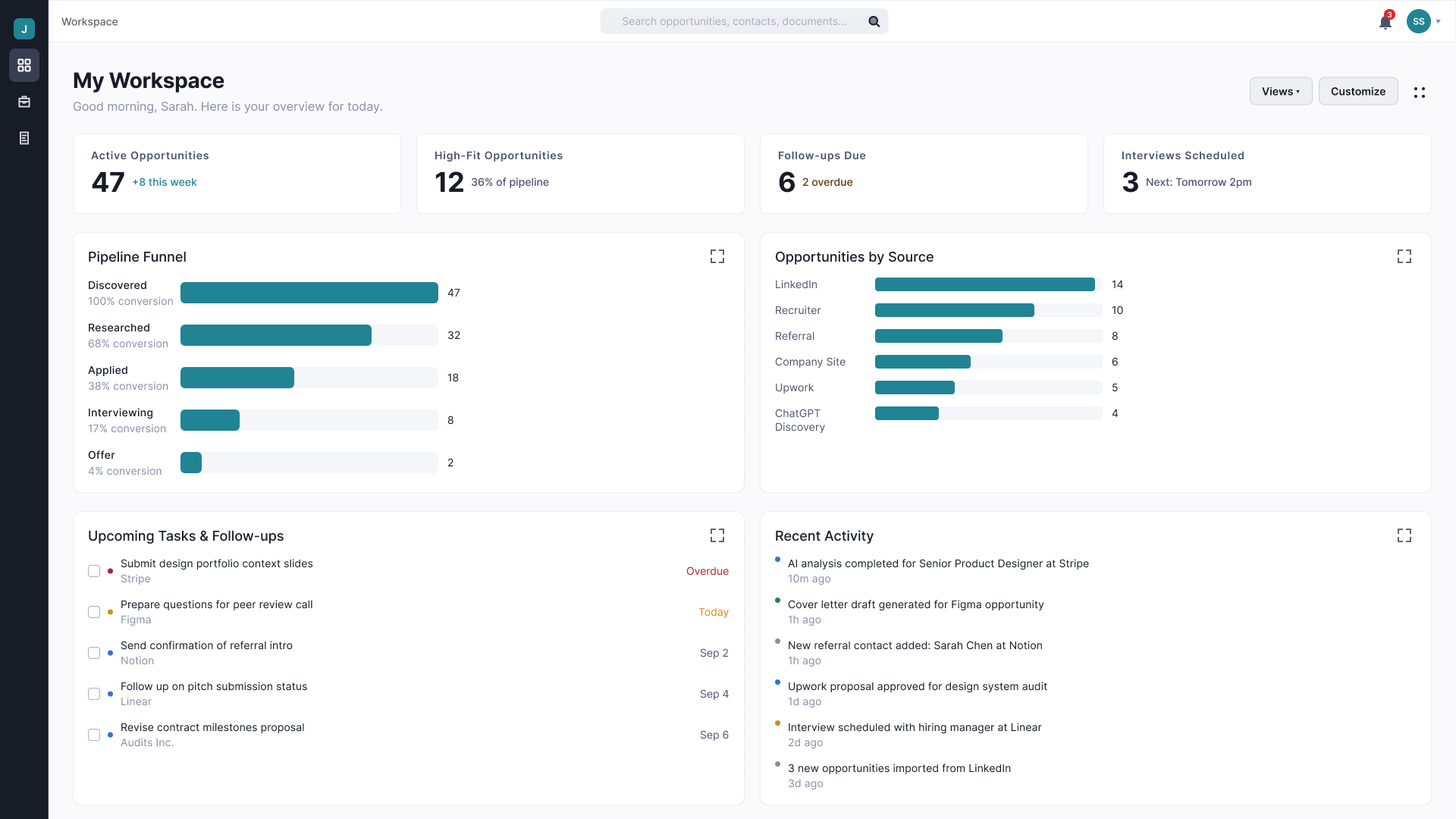
The dashboard acts as the operational hub: surfacing active opportunities, priorities, review work, tasks, and career context while providing direct paths into deeper workflows.
CANONICAL DASHBOARD
A modular command center designed to support routine work without forcing every task into a separate workspace.
PRODUCT PROBLEM
Professionals often reconstruct the state of their search manually across job boards, recruiter conversations, email, documents, spreadsheets, calendars, notes, and AI tools. That fragmentation makes the user the integration layer.
01
Job information, people, communication, documents, and preparation live in separate tools.
02
The user repeatedly reconstructs status, history, and next steps.
03
Follow-ups, preparation work, and evidence become harder to manage as opportunity volume increases.
PRODUCT DIRECTION
The product hypothesis is that keeping the context around an opportunity connected can reduce the manual coordination required to manage a serious job search.
Product hypothesis — validation remains in progress.
OPPORTUNITY-CENTERED WORKFLOW
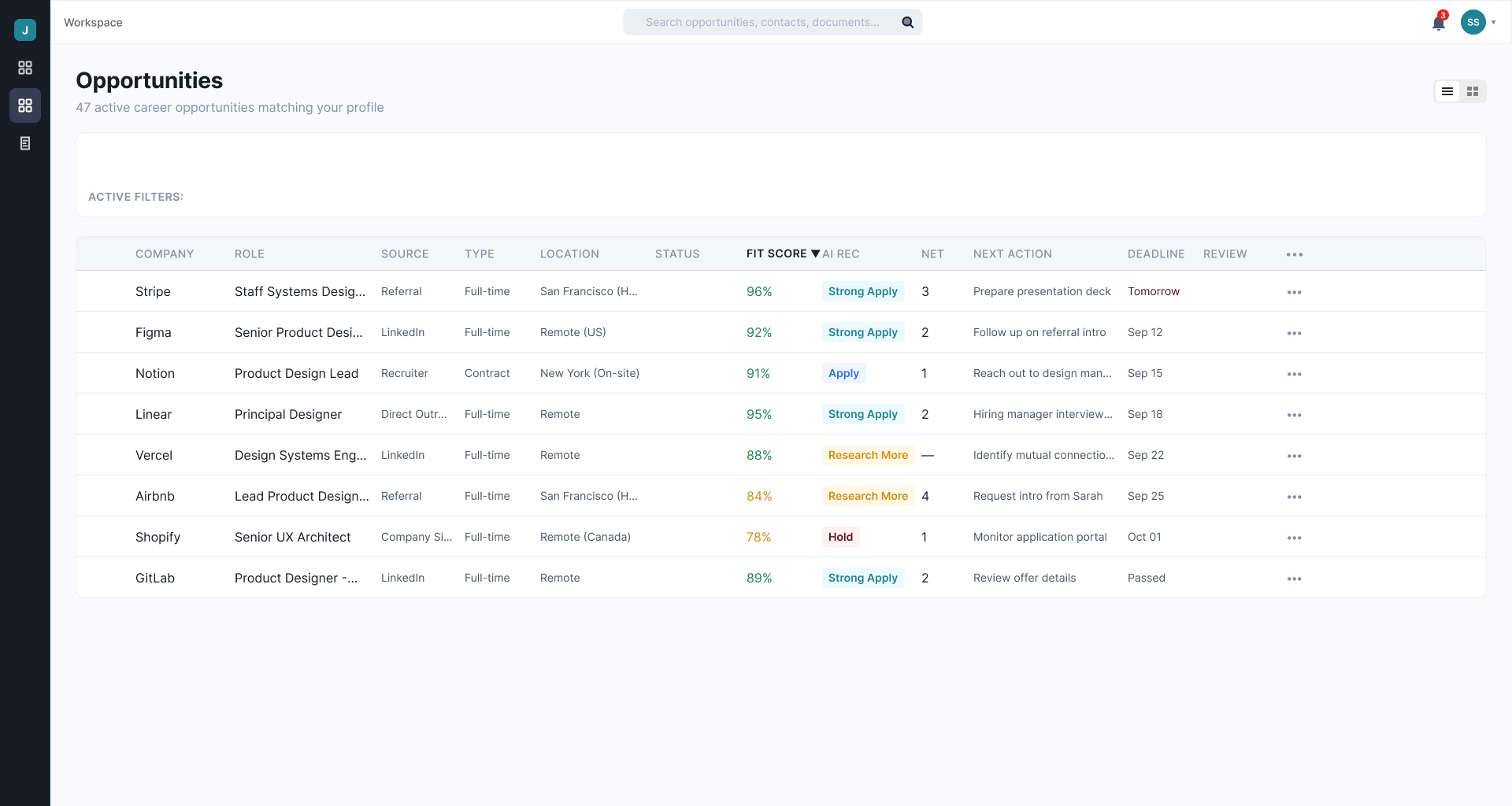
Lifecycle state answers where an opportunity sits. Next action answers what the user should do now, while research, contacts, documents, and communications remain connected to the opportunity.
Where is this opportunity?
What should I do now?
Keep people, evidence, documents, and communication with the opportunity.
OPPORTUNITY WORKSPACE
A structured workspace for managing active opportunities without reducing the experience to a static application log.
MY ROLE
My work spans product definition and UX execution: shaping the operating model, defining product principles and workflows, structuring information architecture, designing canonical experiences, and creating the system needed to carry decisions into implementation.
Product direction, capability definition, roadmap thinking, prioritization, and boundaries.
Sitemap, navigation, journeys, workflows, state models, and continuity.
Dashboard modules, opportunity workflows, contextual actions, and progressive disclosure.
Atomic components, semantic tokens, states, forms, navigation, themes, and responsive behavior.
Transform complex workflows for tablet and mobile without simply shrinking the interface.
Define reusable system rules and interaction boundaries to reduce implementation drift.
PRODUCT PRINCIPLES
Career-profile claims and job-fit reasoning remain connected to evidence and provenance.
AI can research, analyze, recommend, and draft, but external-facing actions require approval.
Reveal deeper tools when focused work is required.
The system does not autonomously apply, contact, send, or approve.
SYSTEM THINKING
Token-bound components, themes, reusable states, validation patterns, forms, and shared shell components.
Desktop supports command-center work while mobile emphasizes awareness, action, preparation, capture, and continuity.
Readable type, touch targets, semantic structure, clear states, recovery behavior, and accessibility are system requirements.
PRODUCT SCOPE
Dashboard + Saved Views
Opportunity Management
Interview Intelligence
Career Profile
Tasks + Follow-Ups
Review Queue
Search + Notifications
Contacts + Communication
Authentication + Account
Subscription + Entitlements
Responsive Experiences
Administrative Operations
Capability maturity varies. Product strategy, canonical design direction, and implementation status are tracked separately.
The full portfolio case study will examine Product Strategy, UX Problem Solving, Research + Validation, and Design System. Until then, this page provides an overview of the current product direction and systems being designed to support it.