01 / Case study overview
A unified UX framework for warehouse operations
GEODIS WMS translated fragmented warehouse workflows, dense operational data, and disconnected legacy processes into a scalable UX framework spanning inventory, item data, operational setup, and shipping execution.
Challenge
Warehouse teams needed to manage high-volume workflows across inventory, item data, shipping, and account configuration while working within years of legacy system growth and disconnected processes.
Users
Inventory specialists, warehouse specialists, shipping supervisors, administrators, and operations managers working across setup, inventory accuracy, item compliance, shipping execution, and exception handling.
Solution
A modular WMS experience with task workbenches, dashboards, structured forms, reusable tables, validation, progressive disclosure, design system patterns, and development-ready documentation.
Product value
Supported modernization through workflow visibility, product consistency, operational control, and design-to-development alignment.
02 / Role + contribution
Sole UX / Product Partner
I served as the sole UX/product partner translating legacy warehouse complexity, user needs, stakeholder input, and modernization goals into structured WMS workflows, reusable design patterns, and development-ready product direction.
UX architecture and workflow design
Mapped connected workflows across setup, item data, inventory operations, shipping execution, dashboards, validation, and exception handling.
Research and discovery
Conducted individual and group interviews with warehouse workers, supervisors, admins, SMEs, and business stakeholders. Workflow mapping, stakeholder reviews, SME discussions, usability feedback, and iterative prototyping informed the product direction.
Data-dense UX and interaction patterns
Structured tables, filters, forms, task queues, dashboards, status states, and progressive disclosure. Created patterns for search, saved views, pagination, validation, actions, role-based visibility, and workflow recovery.
Product ownership
Helped define product direction, workflow priorities, Agile process structure, and alignment between business stakeholders, UX, and development.
Design-to-development system
Created detailed documentation, shared language, reusable patterns, and a custom IcoMoon icon library to support consistent implementation.
Scope and delivery
Owned UX architecture, workflow structure, product direction, design-system patterns, and documentation. Delivered reusable workflows, screen patterns, stakeholder alignment, and development-ready product guidance.
I helped stabilize and accelerate modernization by translating warehouse data, user research, stakeholder feedback, and operational requirements into a product structure that users could understand and teams could build.
03 / Value snapshot
What changed through the UX work
The modernization helped turn fragmented warehouse workflows into a clearer product framework for operational visibility, workflow consistency, and scalable enterprise UX.
Reduced workflow fragmentation
Connected setup, item data, inventory operations, shipping, dashboards, validation, and exception handling within a clearer WMS product framework.
Improved operational visibility
Task queues, dashboards, status states, activity history, and reporting views gave supervisors clearer visibility into warehouse work.
Reusable product patterns
Tables, filters, saved searches, cards, status states, validation, action menus, and section navigation became repeatable across modules.
Modernization delivery
Design documentation, shared UX patterns, and development-ready workflows helped align business stakeholders, UX, and engineering.
04 / Product context
Modernizing warehouse operations into a scalable product platform
GEODIS WMS was part of the broader Synapse modernization effort. The previous system had grown over many years, with new UI, data needs, and operational requirements added wherever they could fit, often without a clear relationship to the user process. This created friction across task flows, data interpretation, exception handling, and operational decision-making.
Modernization opportunity
Deep exploration of warehouse data, user roles, workflow dependencies, and operational exceptions helped rebuild the experience around how teams actually worked. Research and workflow mapping connected system data, user decisions, and downstream outcomes.
Product direction
Setup, item data, inventory operations, shipping execution, dashboards, reporting, and exception handling became a unified product foundation and a repeatable model for related GEODIS workflows.
From fragmented workflows to a unified framework
Legacy technical constraints and UI added around system limitations gave way to responsive UI, progressive disclosure, and preventive validation.
From context switching to operational visibility
Role-based workflows, dashboard views, and reporting supported clearer decisions, error prevention, task completion, and exception management.
05 / UX architecture
Designing the WMS as a connected operating system
Administrative setup, item data, inventory workflows, and shipping execution were connected into a scalable product ecosystem. Shared operational context reduced fragmentation across related tasks.
Tool Hive / Admin Setup
Customer, business unit, account, warehouse, location, labor standards, and BI plugin. Role configuration, account setup, and operational parameters establish the foundation.
Item Master
Item maintenance, regulated products, product groups, UOM, specifications, receiving rules, and shipping rules. Item records, compliance data, and attribute management connect to downstream operations.
Inventory Operations
Cycle Count, Physical Inventory, task queues, saved searches, accuracy dashboards, and activity logs. Location management, count progress, and inventory accuracy support ongoing warehouse control.
Shipping Execution
Single package, multi-piece shipment, manual shipment, carrier/service selection, rate results, print/void, and validation. Shipping orders, manifests, and carrier management complete the operational flow.
The architecture connected setup, data, task management, dashboards, validation, and exception handling through reusable WMS workflow patterns.
06 / User context
Designing for the people running warehouse operations
Different warehouse roles had different permissions, priorities, data needs, operational pressures, and exception-handling responsibilities. Screens, permissions, actions, and validation needed to match role-specific decisions.
Inventory Specialist
Goal: maintain accurate item, inventory, and regulated attribute data. UX need: fast access to item records, count status, regulated attributes, exceptions, and data relationships that affected downstream workflows.
Warehouse Specialist
Goal: execute Physical Inventory and Cycle Count tasks. UX need: clear task queues, task status, saved searches, include/exclude actions, and count progress visibility for high-volume warehouse work.
Shipping Supervisor
Goal: manage package shipment workflows and resolve shipping blockers. UX need: guided package entry, carrier/service selection, rate results, validation, print/void, multi-piece status, and error recovery paths.
Admin / Account Ops
Goal: configure the operational backbone of the WMS. UX need: structured setup across customer, business unit, account, warehouse, location, labor standards, permissions, and configuration dependencies.
07 / Design system strategy
Supporting light and dark operational workflows
The WMS design system supported both light and dark themes so warehouse teams could work across desktop, tablet, and lower-light operational environments without losing readability, hierarchy, or workflow clarity.
Environment-aware UI
Warehouse users often worked across tablets, shared workstations, and variable lighting conditions where bright screens could create visual strain.
Theme flexibility
Light themes supported standard desktop and admin workflows, while dark themes better supported lower-light operational settings and user preference.
Design-system consistency
Color, elevation, table states, widgets, status indicators, and validation patterns needed to remain readable and consistent across both themes.
The theme system extended the design system across devices, lighting conditions, and work contexts. Qualitative feedback indicated stronger preference for dark-theme workflows in warehouse and lower-light settings.
08 / Workflow deep dive
Designing Cycle Count workflows for accuracy and control
The Cycle Count experience helped warehouse teams turn inventory rules, item/location criteria, task queues, scheduling, and count status into a repeatable workflow for managing inventory accuracy over time.
Count request workflow
Users could define criteria around warehouse, item, location, zone, status, and operational rules so count activity started from structured, reusable inputs.
Task queue management
Task views helped teams review assigned work, recent counts, rule-driven activity, exceptions, and count status from a focused operational workspace.
Accuracy visibility
Overview, performance, scheduler, and activity views supported progress tracking, inventory accuracy review, and follow-up on operational exceptions.
The focus was to structure dense inventory data into repeatable workflows that supported accuracy, task control, scheduling, and exception follow-up.
09 / Workflow deep dive
Designing expandable widgets for operational depth
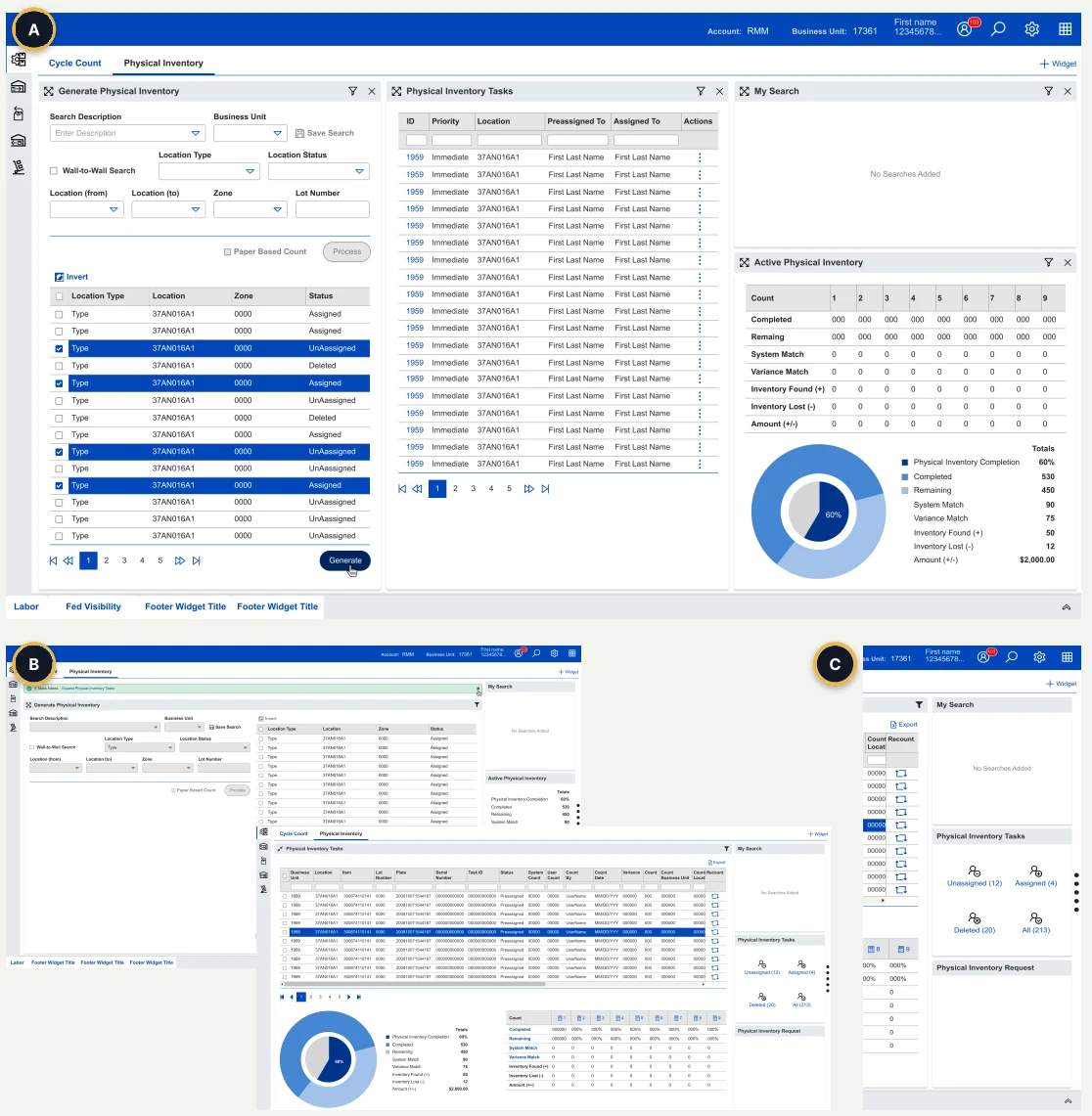
Physical Inventory demonstrates the shared widget model: collapsed dashboard widgets provide minimum required UI, while expanded views expose the full workflow and preserve access to related widgets.
A. Collapsed dashboard widgets
The main dashboard shows the minimum required UI for each widget so users can monitor and start multiple workflows without leaving the workspace.
B. Expanded workflow views
Generate Physical Inventory and Physical Inventory Tasks expand into full working views with the fields, tables, actions, and status detail needed to complete the task.
C. Persistent summary rail
When one widget is expanded, the other widgets remain available in a minimized side rail so users can keep context and reopen related workflows quickly.
The pattern balanced dashboard visibility with workflow depth, allowing users to work deeply in one area without losing access to the rest of the inventory workspace.
10 / Workflow deep dive
Making complex item data manageable
Item Master became the source of truth for product attributes, compliance requirements, receiving rules, storage needs, picking behavior, and shipping workflows across the WMS platform.
Regulated item visibility
Summary panels surfaced regulated products, product types, review needs, compliance-sensitive categories, and attribute relationships that affected downstream workflows.
Section-based editing
Dense item details were organized into focused sections for Item, Unit of Measure, Specifications, Receiving, Shipping, and Regulations so users could work through complexity progressively.
Operational rule management
The workflow supported product groups, aliases, storage rules, valid lots, vendors, receiving capture, shipping rules, and other data dependencies that shaped warehouse execution.
Progressive disclosure turned dense item data, compliance rules, and downstream workflow dependencies into a clearer source-of-truth experience.
11 / Platform foundation
Designing the configuration backbone for warehouse operations
Tool Hive gave teams a structured way to manage the customers, business units, accounts, warehouses, locations, labor standards, permissions, and integrations that powered downstream WMS workflows.
Operational hierarchy
Customer, business unit, account, warehouse, and location setup connected users, roles, and workflows to the right operational context.
Configuration dependencies
Account settings, shifts, warehouse setup, locations, labor standards, permissions, and integrations had to support downstream inventory, item, and shipping workflows.
Scalable admin patterns
Reusable tables, forms, status states, search, edit, copy, save, upload, and validation patterns created consistency across administrative workflows.
Reusable configuration patterns supported platform scalability, role-based access, and downstream workflow consistency.
12 / Design system thinking
Reusable patterns for dense enterprise workflows
Across GEODIS WMS modules, reusable interaction patterns helped teams navigate dense data, complete tasks, review status, recover from exceptions, and support consistent design-to-development implementation.
Data tables
Sorting, scrolling, pagination, row-level actions, and status visibility for dense operational records.
Search and filters
Structured criteria, saved searches, and reusable filters to narrow large data sets and repeat common workflows.
Status states
Pending, Added, Error, Active, Inactive, Assigned, and Unassigned made progress and blockers visible.
Action menus
Contextual actions supported assigning, prioritizing, restoring, deleting, printing, voiding, copying, saving, and workflow recovery.
Dashboards
Summary cards and charts surfaced completion, accuracy, variance, activity, performance, and operational exceptions.
Section navigation
Focused form sections supported progressive disclosure and reduced cognitive load.
Validation
Required fields, inline errors, disabled actions, and recovery guidance helped identify blockers before workflow completion.
Custom design system
Reusable UI patterns, design-to-development language, documentation, and a custom IcoMoon icon library supported consistent implementation.
13 / UX rationale
Mapping operational complexity to UX decisions
Understanding legacy workflows, data relationships, role needs, and exceptions helped translate operational complexity into actionable product decisions.
Moving across inventory, item data, shipping, setup, and reporting
Connected related workflows into a modular WMS product structure.
Different permissions, priorities, and operational views
Matched screens, actions, and validation to role-specific decisions.
Dense tables and item records
Used tables, filters, saved searches, pagination, dashboards, and structured forms to help users find the right data.
Compliance-sensitive attributes affecting downstream workflows
Applied section-based editing and progressive disclosure for dense item data.
Count progress, task status, accuracy, and variance review
Combined task queues, status states, dashboards, summaries, and activity logs.
Missing shipment data, package errors, and carrier decisions
Added required-field validation, package states, rate results, and recovery paths.
Dependencies across customers, accounts, warehouses, locations, and labor rules
Created reusable admin patterns for configuration and downstream workflow consistency.
Each response aimed to help users find data, understand status, prevent errors, manage exceptions, and complete work with less context switching.
14 / Challenges + next iterations
What we had to solve next
The modernization required balancing legacy constraints, dense operational data, role-specific workflows, and development alignment while creating a product foundation that could continue to scale.
Legacy workflow complexity
Years of accumulated workflows, data structures, and UI patterns did not always map clearly to how warehouse teams worked.
Dense operational data
High-volume tables, filters, dashboards, states, and forms needed to preserve speed, accuracy, and operational context.
Role and permission differences
Specialists, supervisors, administrators, and account teams needed different levels of visibility and control.
Design-to-development alignment
Reusable patterns and documentation needed to be clear enough to implement consistently across modules.
Next: measure workflow efficiency
Track task completion time, count-review time, exception-resolution time, and support needs across key workflows.
Next: validate role-specific dashboards
Test whether supervisors, specialists, and administrators need different default views, filters, and KPI summaries.
Next: strengthen UI-to-workflow guidance
Clarify relationships between task cards, dashboard widgets, status states, and the interface areas they support.
Next: expand design-system documentation
Continue documenting reusable table, filter, status, validation, action-menu, and section-navigation patterns for future modules.
These measurement and validation activities are next-iteration opportunities, not reported quantitative outcomes.
15 / Product value + evidence
Designing for visibility, consistency, and operational control
The WMS experience created a scalable UX framework for high-volume warehouse workflows across inventory, item data, shipping, and operational setup.
Reduced context switching
Workbenches combined search, task management, dashboards, and actions so users could manage workflows from fewer places.
Improved data consistency
Structured forms, reusable tables, required fields, and validation supported cleaner data across WMS modules.
Better supervisor visibility
Dashboards, task queues, status states, performance summaries, and activity logs made work progress easier to monitor.
Reusable product framework
Shared forms, tables, filters, cards, states, and actions created consistency across inventory, shipping, and admin workflows.
Exception recovery
Validation, package status states, required-field errors, and recovery paths helped identify and resolve blockers.
Modernization framework
A repeatable UX foundation combined complex GEODIS product workflows into scalable, consistent enterprise applications.
Evidence: user preference
Qualitative feedback indicated stronger preference for dark-theme workflows in warehouse and lower-light contexts.
Evidence: stakeholder alignment
Reviews helped align legacy requirements, operational needs, UX direction, and development implementation.
Evidence: reusable delivery model
Patterns, documentation, and shared interaction language gave development teams a more consistent model for building across modules.
16 / Case study summary
Turning fragmented operations into clear product systems
GEODIS WMS demonstrates my ability to translate legacy operational complexity, dense warehouse data, user needs, and modernization goals into clear, scalable enterprise UX systems.
Enterprise UX architecture
Connected configuration, item data, inventory operations, shipping execution, dashboards, validation, and exception handling.
Complex workflow simplification
Translated dense warehouse processes into role-aware screens, task queues, dashboards, status states, progressive disclosure, and reusable patterns.
Data-dense product design
Designed for high-volume tables, search, filters, forms, validation, operational context, compliance rules, and exception-heavy workflows.
Product modernization support
Helped move modernization forward through a scalable UX foundation across workflows, teams, development patterns, and product areas.
This is the enterprise UX work I do best: turning complex, fragmented operations into clear product systems that users can work in, teams can build, and organizations can scale.